AG JOYSTICK PLUGIN
A downloadable project
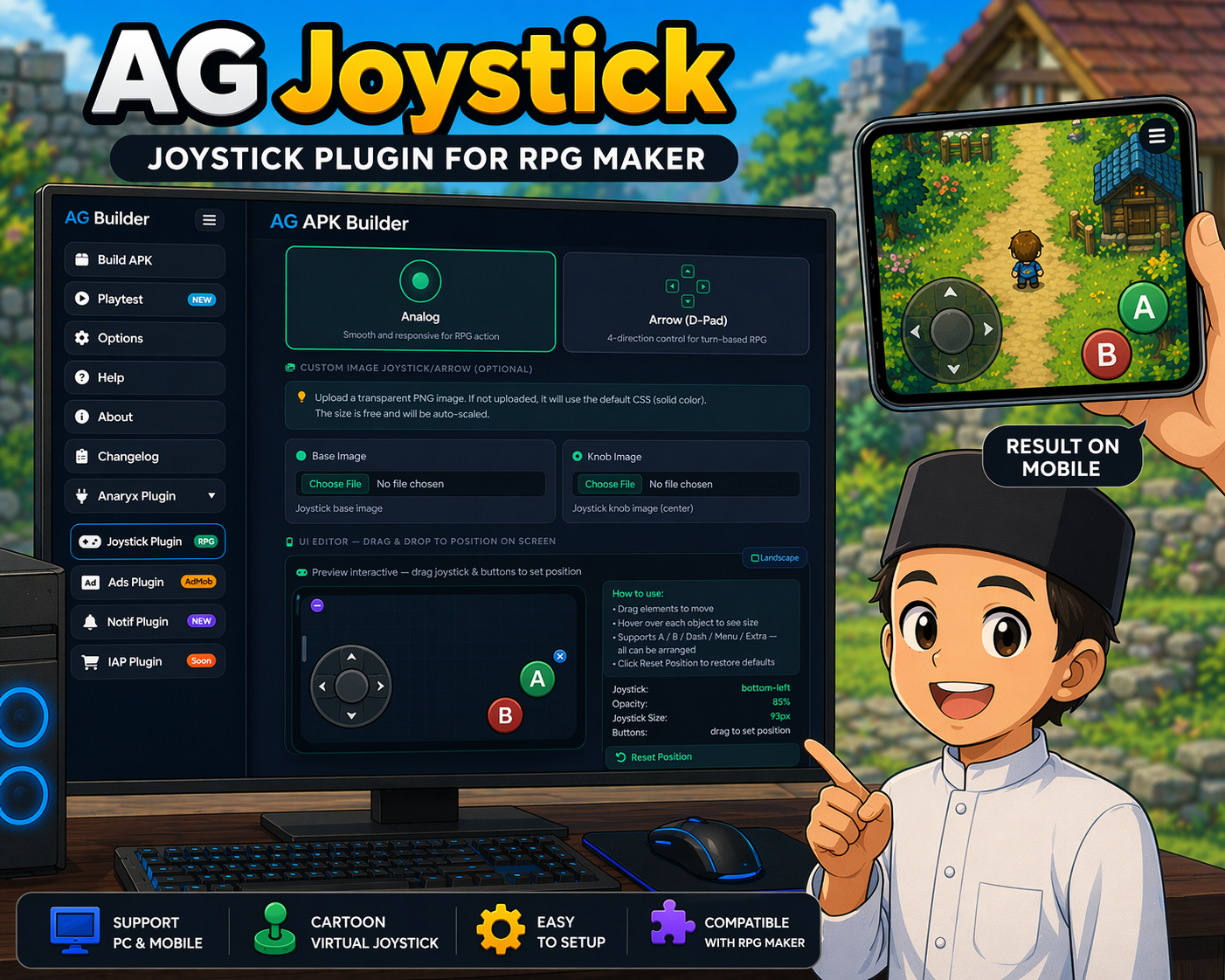
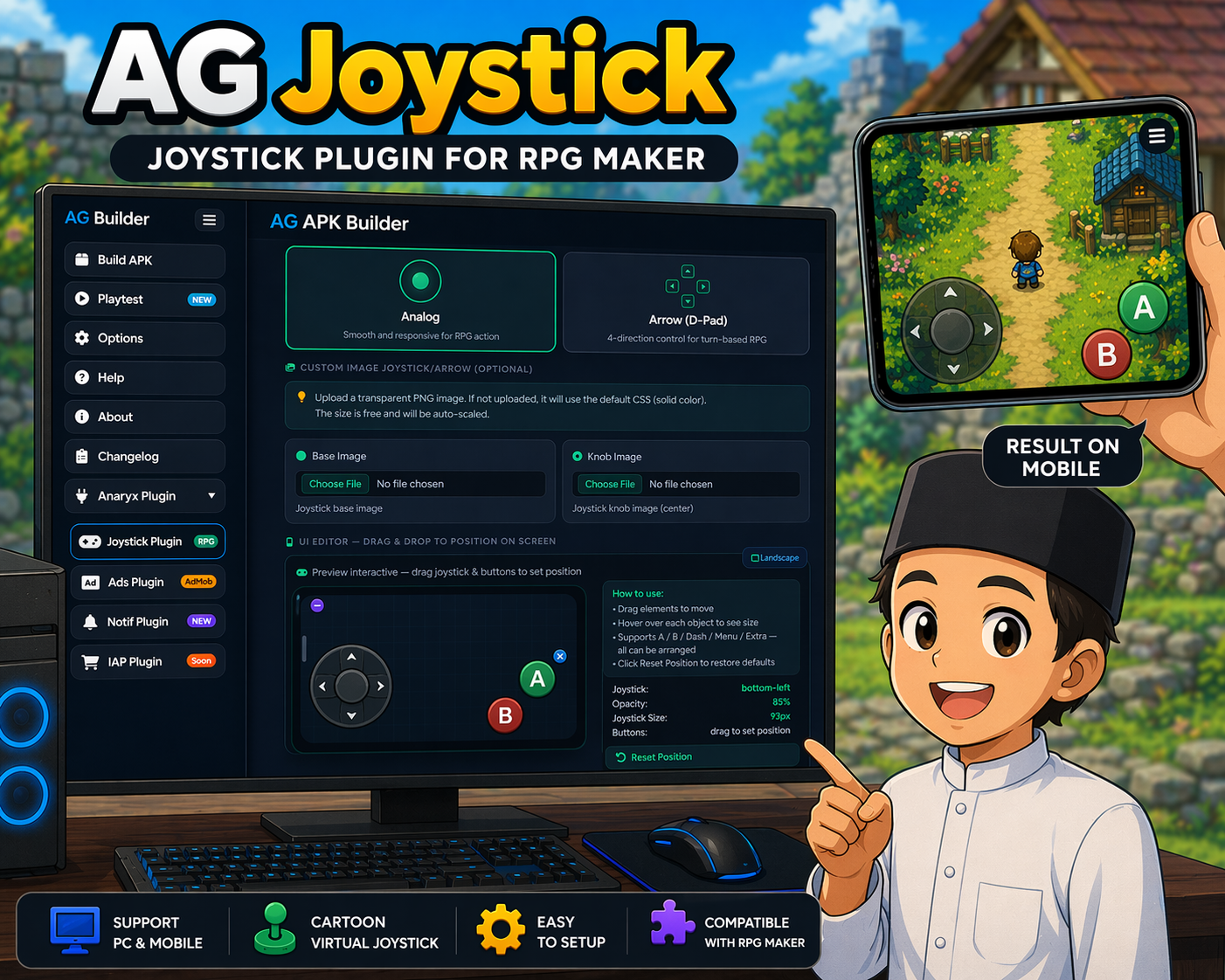
AGJoystick Full — Virtual Joystick + Action Buttons for Android
Tired of your RPG Maker game on Android having zero touch controls? AGJoystick slaps a fully-featured virtual joystick and action buttons right onto your screen. Everything is configured through AG APK Builder's UI Editor — no coding required (unless you want to flex).
Available for both RPG Maker MZ and RPG Maker MV, deployed on Android via AG APK Builder.
Available Versions
| File Name | Engine | Language | Plugin Name in Plugin Manager | Version |
|---|---|---|---|---|
| AGJoystick_Full_EN.js | RPG Maker MZ | English | AGJoystick_Full_EN | 3.5.1 |
| AGJoystick_Full_ID.js | RPG Maker MZ | Indonesian | AGJoystick_Full_ID | 3.5.1 |
| AGJoystick_Full_EN_MV.js | RPG Maker MV | English | AGJoystick_Full_EN_MV | 3.6.0-MV |
| AGJoystick_Full_ID_MV.js | RPG Maker MV | Indonesian | AGJoystick_Full_ID_MV | 3.6.0-MV |
Use ONLY ONE version at a time. Pick the one that matches your engine and preferred language.
Key Features
- Virtual joystick with analog or D-pad (arrow button) mode
- Action buttons: A, B, Dash, Menu — all customizable
- Extra buttons with custom actions (Common Event / Script / Plugin Command)
- Image support for joystick base, knob, and all buttons
- Opacity, size, position, dead zone — all tweakable from UI Editor
- Auto-hide mode so the joystick disappears when not in use
- Script calls and Plugin Commands for full control from events
- Removes RPG Maker's default on-screen menu button automatically
- MV only: Smart Menu/Back button that auto-switches behavior depending on the current scene
How Configuration Works
Unlike most plugins, joystick position, size, colors, and button images are configured in AG APK Builder's UI Editor — not in the RPG Maker Plugin Manager.
The Plugin Manager parameters here only handle:
- Whether to remove RPG Maker's built-in menu button
- Extra button actions (Common Event / Script / Plugin Command) matched by label
- MV only: Back button label and color when the smart menu button switches to Back mode
Joystick Modes
analog — Classic circular joystick. Drag the knob in any direction for smooth analog movement. Supports dead zone configuration to avoid accidental input.
dpad — Four arrow buttons laid out in a cross. Each button registers a directional input. Button size and gap between arrows are configurable.
Both modes support 8-way or 4-way input mapping and can use custom images instead of default colored circles/arrows.
Action Buttons
| Button | Default Label | Default Color | Maps To |
|---|---|---|---|
| A | A | Green | OK / Confirm |
| B | B | Red | Cancel / Back |
| Dash | ⚡ | Amber | Shift (Dash) |
| Menu | ☰ | Purple | Menu (Smart Button on MV) |
| Extra | Custom | Custom | Common Event / Script / Plugin Command |
All buttons can be replaced with custom images from img/pictures/.
Smart Menu / Back Button (MV Only)
RPG Maker MV doesn't have a native on-screen menu button. AGJoystick MV automatically creates one that's context-aware:
- On Scene_Map — button shows as Menu (☰) → tap opens Scene_Menu
- On any other scene (Battle, Options, Menu, etc.) — button switches to Back (✕) → tap closes the scene / goes back
This works automatically with no extra setup needed. The label and color of the Back state are configurable via Plugin Manager parameters.
In the MZ version, this behavior is handled differently via the useNativeMenu setting injected by AG APK Builder.
Extra Buttons
You can add extra buttons in the UI Editor and assign actions to them via the Plugin Manager. Just match the Label field between the UI Editor and the Plugin Manager entry (case-sensitive).
Supported action types:
- Common Event — triggers a Common Event by ID
- Script — runs a JavaScript snippet
- Plugin Command — fires a Plugin Command
Example: Label = "L", Action = Common Event, ID = 5 → the button labeled "L" in UI Editor will trigger Common Event #5.
MZ version — Extra actions are configured as a structured list in Plugin Manager (each entry has its own fields).
MV version — Extra actions are configured as a raw JSON array in the parameter field. Format:
[
  {"label":"L","actionType":"CommonEvent","commonEventId":5,"script":"","pluginCommand":""},
  {"label":"R","actionType":"Script","commonEventId":1,"script":"SceneManager.push(Scene_Options);","pluginCommand":""}
]
Script Calls
Works the same on both MZ and MV:
AGJoystick.show()         — Show joystick and buttons
AGJoystick.hide()         — Hide (tap events still active)
AGJoystick.toggle()       — Toggle show/hide
AGJoystick.isVisible()    — Returns true/false
AGJoystick.setOpacity(n)  — Set opacity 0–100
Plugin Commands
MZ version — Use via Event → Plugin Command (structured UI):
| Command | Description |
|---|---|
| Show Joystick | Show the virtual joystick and buttons |
| Hide Joystick | Hide the controls (tap events still active) |
| Toggle Joystick | Toggle show/hide |
| Set Opacity | Change opacity at runtime (0–100) |
MV version — Use via Event → Plugin Command (text format):
AGJoystick ShowJoystick
AGJoystick HideJoystick
AGJoystick ToggleJoystick
AGJoystick SetOpacity 85
Plugin Parameters
Shared parameters (both MZ and MV):
| Parameter | Type | Default | Description |
|---|---|---|---|
| Remove Native Menu Button | Boolean | true | Removes RPG Maker's built-in on-screen menu button. Enable this if you're using AG APK Builder's menu button instead. |
| Extra Button Actions | Struct list (MZ) / JSON array (MV) | [] | Assign actions to extra buttons created in UI Editor. Match label exactly with the button label in UI Editor. |
MV-only parameters:
| Parameter | Type | Default | Description |
|---|---|---|---|
| Back Button Label | Text | ✕ | Label shown on the smart menu button when it switches to Back mode. Options: ✕, ←, BACK, etc. |
| Back Button Color | Text (hex) | #ef4444 | Color of the button when in Back mode. Use hex format: #ef4444 (red), #f59e0b (orange), etc. |
MZ vs MV — Key Differences
| Feature | MZ (v3.5.1) | MV (v3.6.0-MV) |
|---|---|---|
| Plugin Command format | Structured UI (@command) | Text format: AGJoystick CommandName [arg] |
| Extra button config | Structured list in Plugin Manager | Raw JSON array in parameter field |
| Smart Menu/Back button | useNativeMenu via AG APK Builder config | Automatic, built into the plugin |
| Back button label/color param | Not needed | Configurable in Plugin Manager |
| @command support | Yes | No (MV doesn't support it) |
Setup
- Drop the correct plugin file (MZ or MV) into your game's
js/plugins/folder. - Enable it in RPG Maker's Plugin Manager. Make sure the plugin name matches the filename exactly.
- Set up joystick layout, button positions, sizes, and images in AG APK Builder's UI Editor.
- Configure extra button actions in the Plugin Manager if needed.
- Build your APK with AG APK Builder and test on an Android device.
Compatibility
- Engine: RPG Maker MZ / RPG Maker MV
- Platform: Android (via AG APK Builder)
- Default menu button: Removed automatically when the plugin is active (if parameter is enabled)
Troubleshooting
Joystick not showing up:
- Make sure the plugin name in Plugin Manager matches the filename exactly.
- Joystick only renders on mobile/touch devices. It won't appear in desktop preview.
- Check that joystick visibility is enabled in AG APK Builder's UI Editor.
Extra buttons not doing anything:
- The Label must match exactly (case-sensitive) between Plugin Manager and UI Editor.
- MV: Verify the JSON array is valid — no trailing commas, all strings in double quotes.
Two menu buttons on screen (MZ):
- Enable "Remove Native Menu Button" in Plugin Manager to remove the default RPG Maker one.
Smart menu/back button not working (MV):
- This is fully automatic — no extra config needed. Check that the plugin is loaded correctly.
Opacity or layout looks off:
- Opacity, size, and position are managed in AG APK Builder's UI Editor, not in Plugin Manager.
- Use
AGJoystick.setOpacity(n)at runtime to change opacity dynamically from an event.
Terms of Use
- Full version: Free to use for both commercial and non-commercial projects.
- You may modify the code for personal use.
- Do NOT redistribute or share this plugin file with others.
- Do not remove the author signature / credits inside the script.
- Do not claim this as your own work or resell it.
Feedback, Bug Reports, and Support
Spotted a bug, hit a weird error, or have a feature idea? Drop a comment or reach out directly.
Contact: anaryxproject@gmail.com
AGJoystick Full — part of the Anaryx Plugin ecosystem.
Built for RPG Maker MZ and MV devs who want proper touch controls on Android.
Every plugin is packed with an integrity signature — don't mess with it.
anaryx-plugin.itch.io
Download
Click download now to get access to the following files:
Development log
- JOYSTICK PLUGIN RELEASED18 hours ago
Leave a comment
Log in with itch.io to leave a comment.